*Copyright @ www.mycsg.in;
What is the word meaning of 'Appending'?
- attach
- add (something) to the end of a written document.
Appending or Concatenating SAS datasets
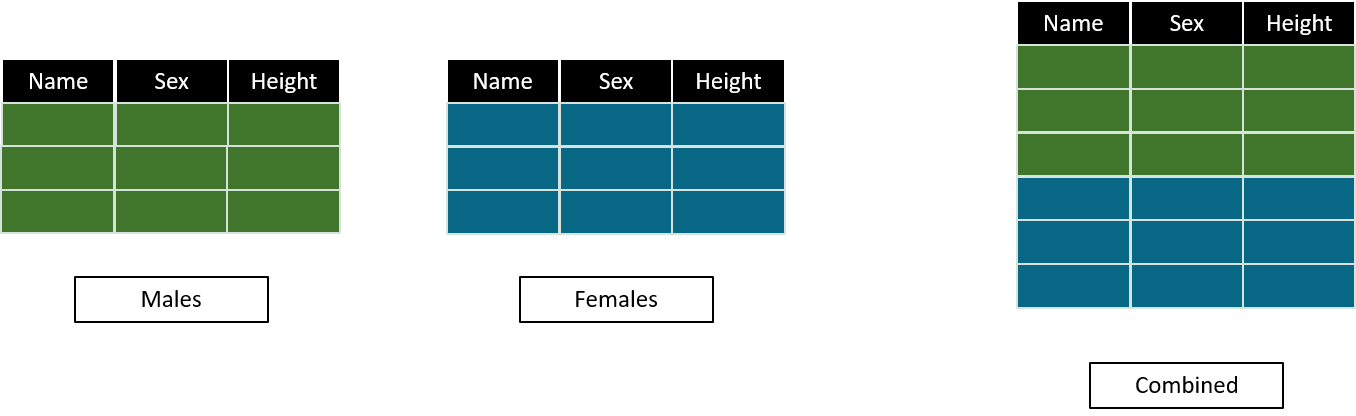
Common scenarios where appending (of datasets) is required in SAS?
- Combine the records of students of different classes when a separate dataset is present for each class
- Combine the records of male and female students when male and female records are present in different datasets
- Combine the records of screen failures and treated subjects when they are present in different datasets
- Combine the records of inclusion criteria and exclusion criteria not met by subjects when they are present in different datasets
- Combine the prior medications data and concomitant medications data of subjects when they are present in different datasets
- Combine all the input datasets available to check the latest available date for a subject across all datasets
What does the SET statement of SAS data step do?
- By definition, the SET statement is used for reading observations from one or more datasets
- When only one dataset name is provided on the SET statement, it reads all observations from that dataset and creates a new output dataset
- The SET statement can also read observations from more than one dataset in a single data step
- We use this ability to append observations from one dataset to another by listing multiple dataset names on the SET statement
- Dataset names on the SET statement are separated by a space
- SAS reads all observations from the first input dataset and then moves to the next dataset in order - so the output dataset contains observations from the first dataset followed by observations from subsequent datasets
Create some example datasets
- We will use sashelp.class (a built-in SAS dataset with student records) and sashelp.cars (a built-in SAS dataset with car records) to create smaller example datasets for this lesson
- The data step below uses multiple OUTPUT statements to write observations to different datasets in a single pass through the input data
- Each IF condition checks a variable value and routes the observation to the appropriate output dataset
- After running the above code, we have 6 smaller datasets - males, females, preteen, teen, sedan, sports, and othercars
- males contains only the records where sex is M, females contains only the records where sex is F
- preteen contains students aged below 13, teen contains students aged 13 and above
- sedan, sports, and othercars contain car records split by the type variable from sashelp.cars
- Notice that the car types not matching sedan or sports are routed to othercars using the ELSE OUTPUT statement
Combining input datasets having same attributes using SET statement
- When appending datasets using the SET statement, SAS includes all variables and observations from each input dataset in the output dataset
- Since we are appending datasets that were created from the same source (sashelp.class or sashelp.cars), they share identical variable names, types, and lengths - this is the simplest appending scenario
Create a dataset named m_and_f by appending males and females datasets using SET statement
- On the DATA statement, we specify m_and_f as the name of the output dataset that will hold the combined observations
- On the SET statement, we list males first and females second - this determines the order of observations in the output dataset
- SAS reads all 10 observations from males into the output first, then reads all 9 observations from females
- The result is a dataset with 19 observations - 10 male records followed by 9 female records
- View the datasets below and confirm that m_and_f has all records from both males and females, in that order
Create a dataset named cars1 by appending sedan and sports datasets using SET statement
- Here we apply the same principle to the cars data - sedan is listed first on the SET statement so its observations appear first in cars1
- sports observations are appended after all sedan observations
- Notice that othercars is intentionally excluded from this step - cars1 will only contain sedan and sports records
- Confirm in the data view that cars1 observation count equals the sum of sedan and sports observation counts
Create a dataset named allcars by appending cars1 and othercars datasets using SET statement
- In this step we append cars1 (which already contains sedan and sports records) with othercars
- Notice that othercars is listed first on the SET statement this time - so othercars observations will appear first in allcars followed by cars1 observations
- This demonstrates that the order of dataset names on the SET statement directly controls the order of observations in the output
- cars1 was created in the previous step and already holds the combined sedan and sports records
- Confirm in the data view that allcars observation count equals othercars plus cars1
Create a dataset named allcars2 by appending sedan, sports, and othercars datasets using SET statement
- The input datasets sedan, sports, and othercars are recreated fresh here to reset them to their original state before the next example
- The SET statement is not limited to two input datasets - you can list as many dataset names as needed, each separated by a space
- Here we append all three datasets - sedan, sports, and allcars - in a single SET statement
- SAS reads sedan first, then sports, then allcars - notice that allcars itself contains othercars and cars1 records from the previous step
- So allcars2 ends up with sedan records first, followed by sports records, followed by all records from allcars (othercars then cars1)
- Compare the observation counts in the data view to confirm that allcars2 contains all expected records