*Copyright @ www.mycsg.in;
What do we mean by reading raw data
- SAS procedures expect data in the form of SAS datasets
- However, data is often collected first in text files, spreadsheets, or other external sources
- Those original text-based sources are often called raw data files
- Converting raw data into a SAS dataset is called reading raw data
What do we mean by data arranged in columns
- Each distinct piece of information collected for an observation is called a variable
- The complete collection of values for one entity is called an observation
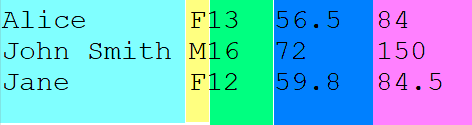
- In column-aligned raw data, each variable is assigned a fixed set of character positions on every line
- For example, columns 1 to 11 may hold a name, while column 12 may hold sex and columns 13 to 15 may hold age
- Even if one value is shorter than the space reserved for it, the next variable still begins in its fixed column position
Types of variables in SAS
- SAS datasets store data in rows and columns where rows are observations and columns are variables
- SAS variables are either numeric or character
- Numeric variables store numbers that can participate in arithmetic operations
- Character variables store text including letters symbols and digit strings that should be treated as text
How do we read raw data arranged in columns into a SAS dataset
- A DATA step is used to create the SAS dataset
- The DATA statement gives the name of the dataset to create
- The INFILE statement identifies the external raw data file
- The INPUT statement describes variable names types and column positions
- A character variable name must be followed by a dollar sign in the INPUT statement
Read raw data from an external file
- A dataset named `students` is created from an external text file
- Five data components are read from fixed column positions
- `name` and `sex` are character variables so they use a trailing dollar sign
- `age` `height` and `weight` are numeric variables
- Each line of raw data becomes one observation in the SAS dataset
- Inspect `students` and confirm that each raw line was converted into one row of structured SAS data
Raw data file screenshot
Read in-stream raw data
- Raw data does not always need to come from an external file
- When raw data lines are written directly inside the SAS program we call it in-stream data
- In this case the `datalines` statement marks the start of the raw data lines
- The same INPUT column specification can be used for in-stream data as well
- The dataset `students01` should contain the same logical variables as `students`
- This example shows that column input works both for external raw files and in-stream raw data
Understand the attributes of a SAS dataset
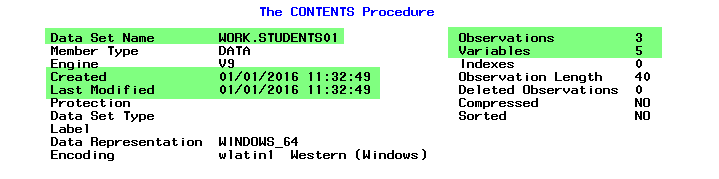
- After creating a dataset we often need to inspect its attributes
- Important dataset level details include dataset name number of observations number of variables and creation metadata
- Important variable level details include variable name type and length
- `proc contents` is used to review these attributes
Dataset attributes screenshot
Variable attributes screenshot
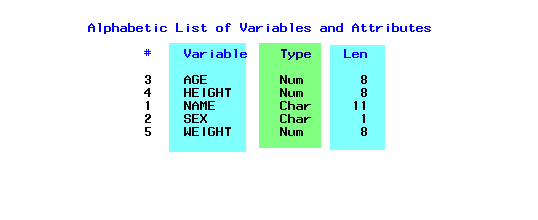
- From the variable attributes you can see the name type and length of each variable
- The `name` variable was read from columns 1 to 11 so SAS assigned it a length of 11 bytes
- The `sex` variable was read from one column so SAS assigned it a length of 1 byte
- Numeric variables usually have a default storage length of 8 bytes unless otherwise specified
Key points to remember
- Reading raw data means converting external text based data into a SAS dataset
- Column input is used when each variable occupies fixed columns on every row
- Character variables require a dollar sign on the INPUT statement
- The same column input logic can be used for external files and in-stream data
- `proc contents` helps verify that the dataset and variable attributes were created as expected