*Copyright @ www.mycsg.in;
What is the word meaning of subset
- A part of a larger group of related things.
Subset observations from a dataset
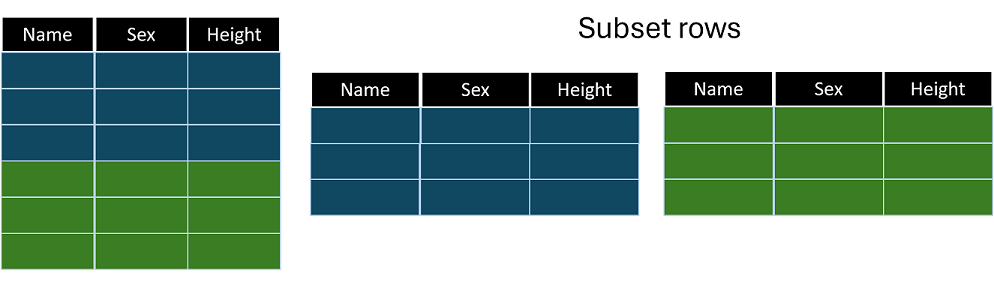
Where do we need to subset data
- Subset the records of cars manufactured in a particular continent
- Select only the male student records from the class dataset
- Identify and list the subjects of a clinical trial whose age is greater than 60
Create sample input datasets
- `class` and `cars` will be used in the subsetting examples below
- Inspect the input datasets first, so you can clearly see which rows are retained by each subsetting technique
Subset records using the WHERE statement
- The `where` statement filters observations based on a condition
- Only observations that meet the condition are read from the input dataset into the DATA step processing stream
- This can be more efficient than reading all observations and discarding some later
Create a dataset named males by subsetting the male student records from class dataset
- Notice in the log the number of observations read and written
- Only observations with `sex="M"` are selected
- Inspect `males` and confirm that all retained observations are male students
Create a dataset named females_preteen by subsetting female student records whose age is less than 13
- Here, the filter depends on two variables, `sex` and `age`
- The conditions are combined with `and` because both must be true
- Verify that every retained observation is female and younger than 13
Create a dataset named cars_mileage by subsetting cars with mpg_city greater than 24 or mpg_highway greater than 30
- This example combines two conditions with `or` because a row is retained when at least one condition is true
- Such compound conditions are common in real filtering tasks
- Inspect the retained rows and confirm that each car satisfies at least one of the two mileage conditions
Subset records using a subsetting IF statement
- When a subsetting IF statement is used, SAS first reads the observation into the PDV and then evaluates the condition
- If the expression evaluates to false, SAS returns to the top of the DATA step without writing the observation
- This is a flexible approach because the IF condition can use variables created earlier in the same DATA step
Create a dataset named females by subsetting female records using a subsetting IF statement
- Compare `females` with the earlier WHERE example, and note that the final selected rows can be the same even though processing differs internally
Create a dataset named select_sedans by subsetting Sedan cars with highway mileage greater than 35 using subsetting IF
Create a dataset named cheap_mileage by subsetting cars with msrp less than 15000 or city mileage greater than 40 using subsetting IF
Subset records using IF THEN OUTPUT
- The `output` statement tells SAS to write the current contents of the PDV to the output dataset
- With `if condition then output;`, we explicitly write only rows that satisfy the condition
- This pattern is useful when one DATA step may write different observations to different output datasets
Create a dataset named tall by subsetting students with height greater than 60 using IF THEN OUTPUT
- Inspect `tall` and confirm that every student has height greater than 60
Subset records using IF THEN DELETE
- The `delete` statement tells SAS to discard the current observation and return to the top of the DATA step
- With `if condition then delete;`, we remove unwanted rows instead of explicitly writing wanted rows
- This is especially convenient when it is easier to describe which observations should be excluded
Create a dataset named short by subsetting students with height less than 60 using IF THEN DELETE
- Because we want the short students, we delete observations whose height is greater than or equal to 60
- Review `short` and confirm that only students with height less than 60 remain
Key points to remember
- `where` filters observations before they are processed in the DATA step
- A subsetting `if` filters after the observation has been read into the PDV
- `if then output` explicitly writes selected observations
- `if then delete` explicitly discards selected observations
- Different subsetting styles can produce the same final result, but differ in processing behavior and flexibility