*Copyright @ www.mycsg.in;
What is the word meaning of subset
- A part of a larger group of related things.
Subset variables from a dataset
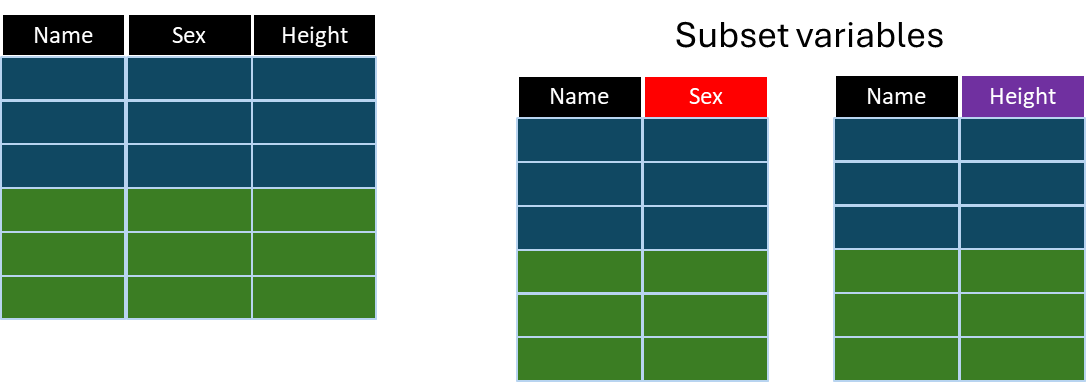
Where do we need to subset data in terms of variables
- Earlier lessons focused on subsetting observations using `where` or `if` logic
- In this lesson, we focus on selecting only the required variables from an existing dataset
- Variable subsetting reduces clutter and creates output datasets tailored to the programming task
Create sample input datasets
- `class` and `cars` will be used in the examples below
- Review the datasets and notice that they contain many more variables than may be needed for a particular task
Subset variables using the KEEP statement
- The `keep` statement lists the variables that should be written to the output dataset
- All other variables are excluded from the final output dataset
Create a dataset named age by keeping the variables Name and Age from class dataset
- Notice in the log how many variables are written to the output dataset
- Only the listed variables appear in the dataset `age`
- Inspect `age` and confirm that all other variables from `class` are absent
- This is one of the most direct ways to subset variables in a DATA step
Create a dataset named height_weight by keeping the variables Name, Height, and Weight from class dataset
- This is the same idea as the previous example, but with a different variable list
- Only `name`, `height`, and `weight` are stored in the output dataset
- Compare `height_weight` with `class` and confirm that only the required variables remain
Subset variables using the KEEP dataset option
- The KEEP dataset option performs variable subsetting while the dataset is being read
- This can be more efficient because unnecessary variables are not even brought into the DATA step processing area
- `age_height` contains only the variables listed in the KEEP dataset option
- Compare this approach with the KEEP statement, and note that both achieve a similar final dataset
Subset variables by dropping unwanted variables
- Sometimes it is easier to list the variables you do not want rather than the variables you want
- In that situation, the `drop` statement or DROP dataset option is useful
- `class_drop` contains all variables from `class` except the variables listed on the DROP statement
- This is especially convenient when only a small number of variables need to be removed
Key points to remember
- Variable subsetting controls which columns are written to the output dataset
- Use `keep` when it is easier to list the variables to retain
- Use `drop` when it is easier to list the variables to remove
- Dataset options such as `keep=` can subset variables as the dataset is read